Software for portable restroom operators
Run your whole business from one place.
Clockwrk handles customers, orders, routes, invoicing and collections, so you can spend time on what actually grows your business.
Features
Everything the office and drivers need to do their jobs.
Click through each part of Clockwrk to see how it works.
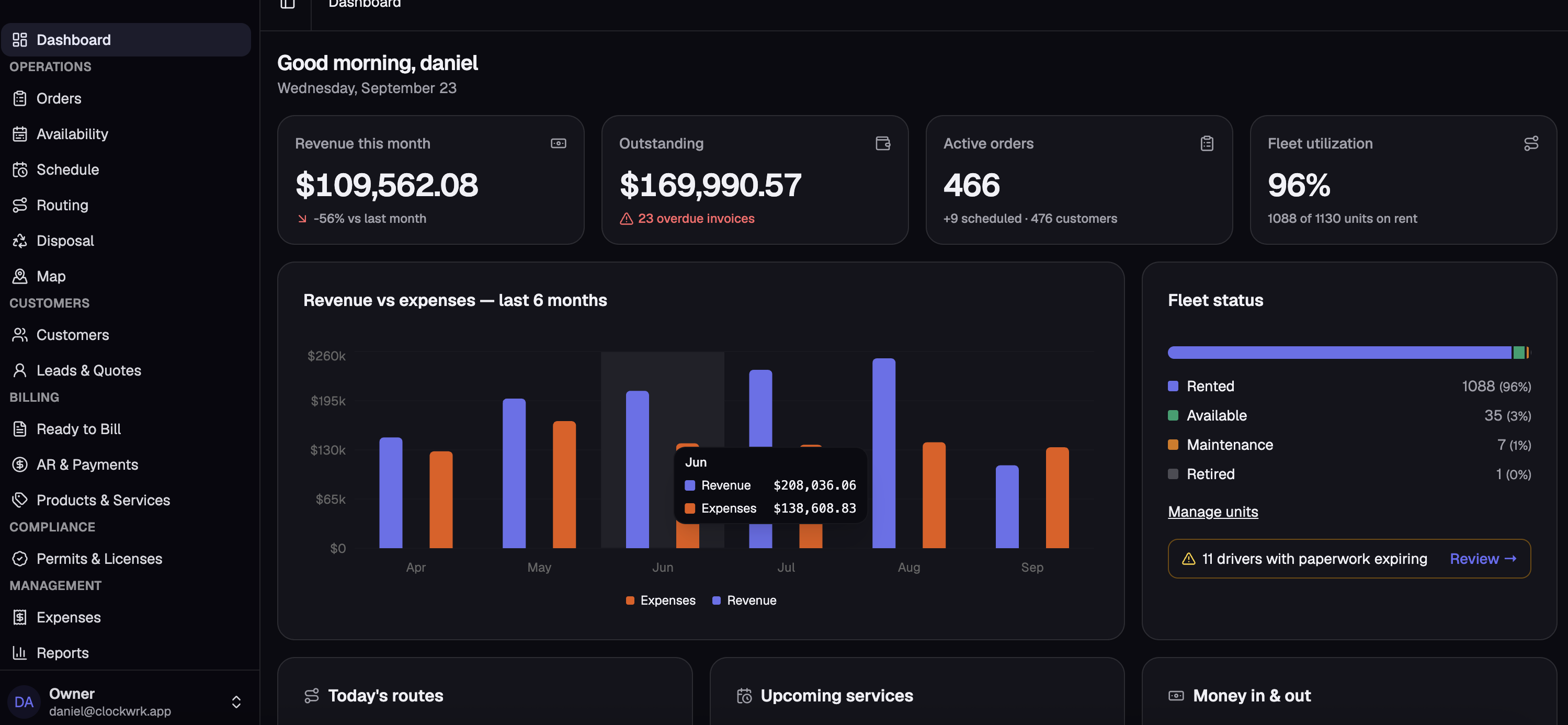
Start every morning knowing exactly where the business stands.
- Revenue this month, what's outstanding and how many invoices are overdue
- Active orders and fleet utilization at a glance
- Revenue vs. expenses for the last six months
- Today's routes, upcoming services and alerts like expiring driver paperwork
Every lead, customer and order in one place, from the first quote to the last pickup.
- Leads & Quotes pipeline: see what's quoted, won and waiting on a follow-up
- A full customer list with open orders, balance due and past-due accounts
- Every order from delivery to pickup, each one tied to its invoice
- Filter orders by draft, scheduled, active, completed or ready to bill
Know what you have available before you say yes to the next job, and prove every unit got serviced.
- An availability calendar by product and day, so you never double-book
- Price, availability and utilization for every product you rent
- Every unit tracked by its own asset code, with status and purchase date
- QR codes on every unit: drivers scan it at the stop for proof of service
Build the day's routes, balance the work between drivers and send it to the truck.
- A daily schedule board: drag stops between routes and catch anything unscheduled
- Auto-optimize the stop order, then add a return to the yard or a disposal run
- A timeline of every route, with each driver starting on their own schedule
- Print it, save a PDF or open the route in maps
See every job site you service, color coded by service day.
- Filter by day to spot where routes overlap
- Draw territories and see the sites and units inside each one
- Check an address or drop a pin to see which route and service day it lands on
- See the closest stops already on that day before you book the job
Bill every job correctly and on time, without chasing paperwork.
- Line items, billing cycles and tax set on each order
- See the billing period, when it's due and exactly what renews next
- Recurring invoices created automatically when a cycle comes around
- A "Ready to Bill" list: email the invoices or run all the card charges at once
Turn the work you already did into money in the bank.
- Total outstanding, past due and average days late at the top of the page
- An aging bar from current to 90+ days, so you know who to call first
- Every open invoice with its age and balance
- Payment history by card, check, ACH or cash, with CSV export
Drivers run their whole route from their phone, and the office watches it fill in.
- A load check before they roll: what's going out, coming back and being serviced
- Every stop with tap-to-navigate directions, gate codes and notes from the office
- Mark each stop Completed, Issue or Skipped, add photos and leave notes for the office
- Live progress, so you stop calling to ask where they are
- Track driver documents and get a heads-up before paperwork expires
NewDriver schedules & availability. Set each driver's working days and hours, and mark vacations and time off. Routes start at the driver's start time, and every ETA follows it.
The numbers you need to price, hire and buy units with confidence.
- Revenue billed vs. cash collected, and where your A/R stands
- Top customers by revenue, new customers and who has churned
- Services, deliveries, pickups and stop completion rate
- Driver productivity: routes, stops done and completion rate for each driver
Set Clockwrk up to work the way your business already runs, not the other way around.
- User access: roles for owner, admin, operations, customer service, dispatch, AR and drivers
- Billing settings: tax rate, proration and refunds, minimums, invoice numbering, footers and email templates
- Inventory settings: count units by quantity or track each one by serial number
- Business details, yards and depots, paperwork reminders and more
Book a demo
See Clockwrk with your business.
Book a demo and I'll walk you through whatever you are struggling with most.
- Enter it once and get hours back every weekA quote becomes the order, the order builds the route and the invoice, and payments land on the customer's account. No retyping the same job into a spreadsheet, a calendar and the accounting software. Recurring invoices build themselves and routes come together in minutes, so your office spends its time on customers instead of paperwork.
- A customer portal that does the work for youYour customers can request rentals, view their invoices, see their service history and make payments on their own, any time. Fewer "did you service my unit?" calls and faster payments without anyone in the office lifting a finger.
- Numbers you can't get anywhere elseWhat each route, customer and unit actually earns, how much of your fleet is working and where your cash is stuck. The data you need to make the big calls: raise prices, add a truck, buy more units or drop a bad account.
- Built from real workflowsEvery screen was designed around how a portable restroom company actually runs day to day, from the morning load check to the end-of-month billing run. Fewer clicks, fewer phone calls and fewer things falling through the cracks.
FAQ
Questions operators ask.
Don't see yours? Bring it to the demo.
Portable restroom operators. It was built around how a rental company actually runs: deliveries, weekly service routes, pickups, billing and collections.
I'll walk you through Clockwrk and focus on whatever you're struggling with most, whether that's routing, billing or getting paid on time.
Drivers work their stops from their phone. They see their route, mark each stop done and scan unit QR codes for proof of service.
Yes. User access settings let you decide what each person can see and do, so drivers, office staff and managers each get what they need.
Tell me what you use today on the demo and we'll go over how to bring your customers, units and open orders into Clockwrk.
We'll go over pricing on the demo once I understand the size of your fleet and what you need.
Ready to see it with your business?
Book a demo and I'll walk you through Clockwrk using the problems you deal with every day.